
 Cyber Strategy
 Cyber Secure
 Cyber Operations
 Cyber Response
 Cyber Resilience
Since August 2024, organizations worldwide have witnessed a sophisticated phishing campaign leveraging OAuth 2.0 device authorization flows. Russian state-linked adversary Storm-2372 has weaponized legitimate authentication mechanisms to bypass MFA controls and compromise accounts across government, IT services, and critical infrastructure sectors.
Our Red Team at DTS Solution has observed organizations rushing to implement AiTM and token theft protections, inadvertently exposing themselves to device code flow exploitation. Adversaries actively probe for gaps in identity access governance implementations, targeting the authentication mechanisms many security teams overlook.
OAuth 2.0 Device Authorization Flow: Technical Foundation
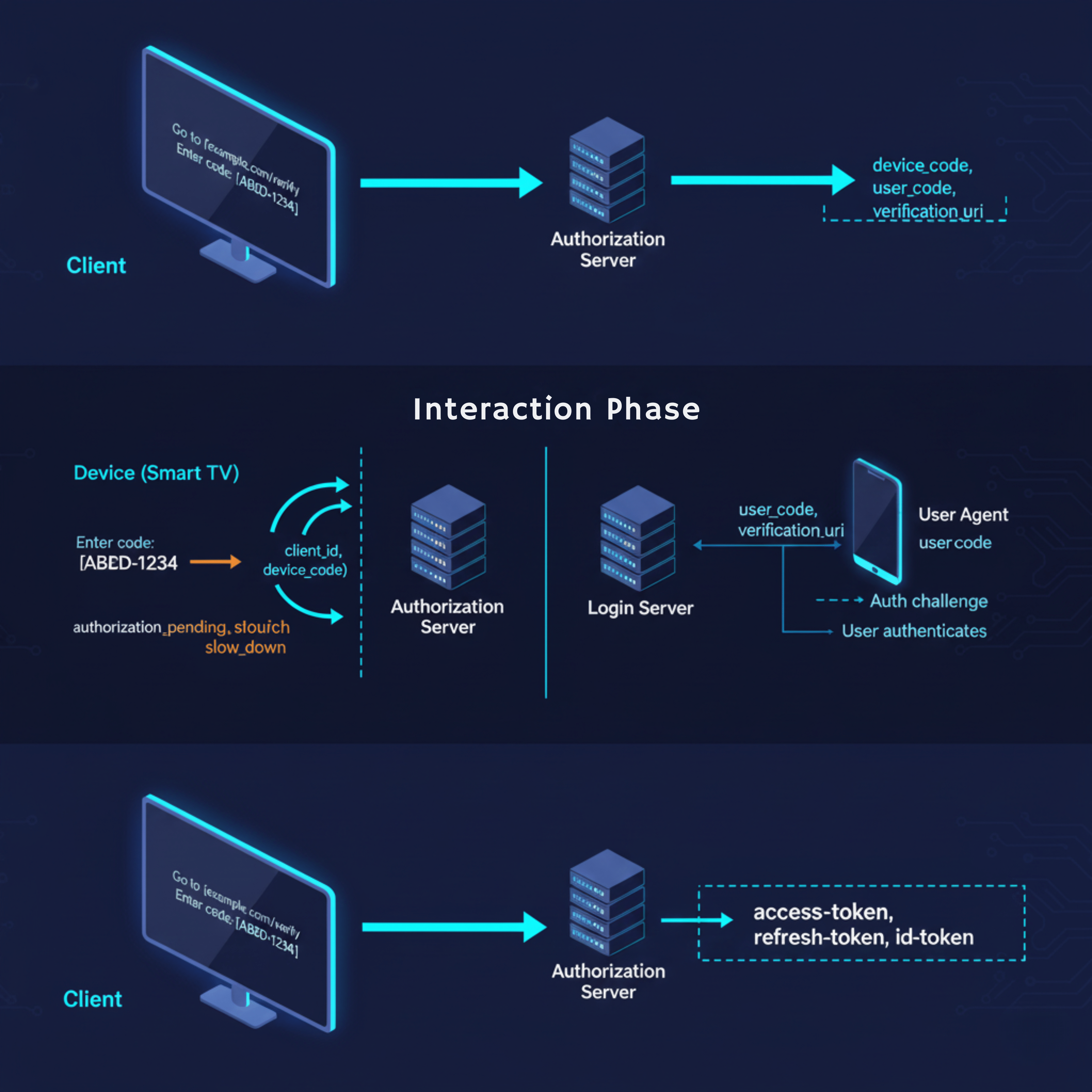
The Device Authorization Flow (RFC 8628) enables authentication on input-constrained devices. Unlike traditional browser-based OAuth flows, this mechanism separates the authorization request from user authentication, creating a two-path authentication cycle.
Standard implementation workflow:
Device Application → Authorization Server: Device Code Request
Authorization Server → Device Application: {device_code, user_code, verification_uri}
User → Verification URI: Enters user_code
User → IDP: Authenticates + Authorizes
Device Application → Authorization Server: Polls with device_code
Authorization Server → Device Application: Access Token
The verification endpoint https://login.microsoftonline.com/common/oauth2/deviceauth accepts user codes without requiring additional MFA when users authenticate from already-trusted sessions. This design creates an attack surface that Storm-2372 actively exploits.
Storm-2372 Attack Methodology
Initial Access Vector
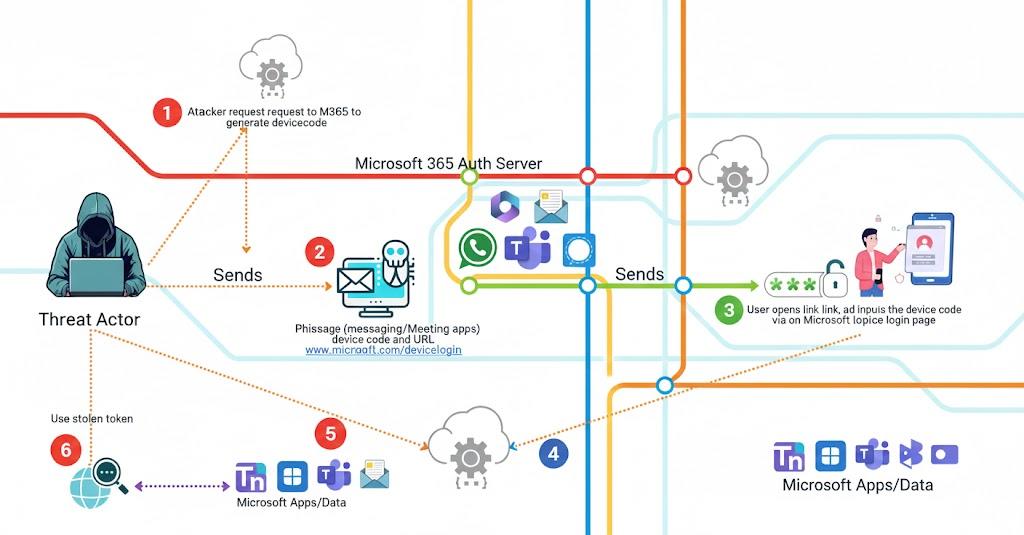
Storm-2372 operators leverage third-party messaging platforms—WhatsApp, Signal, and Microsoft Teams—to establish contact. The adversary crafts messages mimicking legitimate calendar invitations or urgent meeting requests, embedding device codes within seemingly authentic communications.
Sample attack sequence:
- Target receives Teams meeting invitation via Signal/WhatsApp
- Message contains “meeting access code” (device code)
- Hyperlink directs to https://microsoft.com/devicelogin
- Victim enters code, authenticates from trusted session
- Adversary’s polling mechanism captures access token
- Post-compromise: API access, credential harvesting, lateral movement
The authentication URL is legitimate Microsoft infrastructure—bypassing URL reputation filters, SmartScreen protection, and network security controls. Traditional phishing detection mechanisms fail because adversaries exploit Microsoft’s own authentication endpoints.
"Device Code Flow abuse is credential phishing’s “smart play”: instead of building complex AiTM infrastructure, adversaries leverage legitimate authentication flows to slip past defenses tuned for fake login pages. The takeaway is simple—treat authentication-flow governance as a core control, with the same rigor as network and infrastructure security”
Osman, Red Team Director, DTS Solution
Technical Exploitation Mechanics
The attack exploits three architectural characteristics:
- Session Trust Inheritance Users authenticating to the device code endpoint inherit their existing session’s trust level. If the user recently completed MFA for another service, the device code flow accepts this authentication without requiring step-up verification.
- Polling-Based Token Retrieval The device authorization flow uses polling, not push notifications. Adversaries execute:
$response = Invoke-RestMethod -Method Post -Uri “https://login.microsoftonline.com/common/oauth2/v2.0/token” -Body @{
grant_type = “urn:ietf:params:oauth:grant-type:device_code”
code = $device_code
client_id = $client_id
}
- Minimal Audit Trail Device code authentications generate standard sign-in logs with AuthenticationProtocol = deviceCode, but lack contextual indicators that traditional phishing attempts produce. Security teams analyzing authentication logs may not flag these events without specific hunting queries.
Detection Engineering
Baseline Threat Hunting
Query EntraID sign-in logs for device code authentication patterns:
SigninLogs
| where TimeGenerated > ago(90d)
| where AuthenticationProtocol == “deviceCode”
| extend OriginalTransferMethod = tostring(parse_json(AuthenticationDetails)[0].authenticationMethod)
| project TimeGenerated, UserPrincipalName, AppDisplayName, IPAddress, LocationDetails, DeviceDetail, OriginalTransferMethod
| summarize Count=count(), DistinctApps=make_set(AppDisplayName) by UserPrincipalName, IPAddress
| where Count > 3
Conditional Access Policy Architecture
Implementation Requirements
Organizations must implement authentication flow controls through Conditional Access policies. The configuration blocks device code flow universally while maintaining exceptions for legitimate use cases.
Policy configuration:
- Scope: All users (exclude break-glass accounts)
- Target Resources: All cloud apps
- Conditions: Authentication Flows → Device code flow
- Grant Controls: Block access
- Policy State: Report-only → Audit → Enforce
Deployment methodology:
- Deploy in report-only mode (minimum 14 days)
- Analyze ConditionalAccessPolicies log for impact assessment
- Identify legitimate device code usage
- Create targeted exclusions with compensating controls
- Enable enforcement
Exception Handling Architecture
Common legitimate use cases requiring exceptions:
Microsoft Teams Rooms:
- Implement device compliance requirements
- Restrict to known network locations
- Require Intune enrollment
- Apply conditional access for compliant device + trusted network
Developer Workflows:
- Limit to specific applications (Azure PowerShell, Azure CLI)
- Require compliant workstations
- Implement time-based access controls
- Monitor authentication patterns
Critical consideration: Exclusions create security gaps. Each exception requires compensating controls—device compliance policies, network location restrictions, or time-bounded access. Regular quarterly reviews of exclusion lists prevent privilege creep.
Operational Response Procedures
Incident Detection Indicators
Alert on:
- Device code authentication from unusual geolocations
- Multiple device codes generated within short timeframes
- Device code auth followed by mail.read API scopes
- Authentication from impossible travel scenarios
- Device registrations post-device code authentication
Immediate Response Actions
When device code compromise is suspected:
- Isolate: Revoke user sessions via EntraID
- Investigate: Analyze SigninLogs for device code usage timeline
- Scope: Identify accessed resources through AuditLogs
- Contain: Reset credentials, revoke refresh tokens
- Remediate: Block device code flow for affected users
- Hunt: Search for secondary compromise indicators
The incident response timeline matters—adversaries move quickly from initial access to data exfiltration, typically within 4-8 hours of token acquisition.
Supplementary Hardening Measures
Identity Protection Integration
EntraID Identity Protection policies provide defense-in-depth:
- Risk-based Conditional Access: Block sign-ins with medium+ risk
- Continuous Access Evaluation (CAE): Real-time session revocation
- Attack Disruption: Automated response to suspicious patterns
Device Registration Controls
Prevent adversaries from registering devices to bypass policies:
- Restrict device registration to administrators only
- Implement Intune enrollment requirements
- Monitor AuditLogs for Add device operations
- Alert on device registrations following device code auth
Application Permission Governance
Limit blast radius through application consent policies:
- Block user consent for high-risk permissions
- Implement admin consent workflows
- Regular OAuth application audits
- Monitor for suspicious delegated permissions
Our security intelligence operations team recommends implementing these controls as layered defenses—no single control prevents device code exploitation, but combined implementation significantly raises adversary costs.
Research demonstrates that modifying how developers prompt AI models significantly reduces vulnerable code generation. As AI systems increasingly handle both offensive and defensive security operations, organizations must incorporate secure coding techniques into their AI-assisted development workflows.
Explicit Security Requirements
Including security requirements in prompts produces measurably better results. Instead of asking for “a user login system,” specify “a server-side authentication system using OAuth that never stores passwords in client code.”
Language-specific prompts that address known vulnerability classes prove particularly effective. For Python development, prompts might emphasize avoiding pickle for untrusted data and using parameterized database queries. For JavaScript applications, prompts should stress that all authentication occurs server-side and no secrets belong in client code.
Code Review Workflows
Generating code and immediately feeding it back to the AI model for security review catches many issues. This two-pass approach involves first creating functionality, then explicitly asking the model to identify security vulnerabilities in what it generated.
Testing shows this technique reduces vulnerable code by approximately 30-40% compared to single-pass generation. While not comprehensive, it provides meaningful improvement without requiring deep security expertise from developers.
Architectural Boundaries
Critical security decisions must occur in places users cannot access or modify. For web applications, this means all authentication and authorization happens on backend servers. Client code should only collect credentials and send them to protected endpoints for validation.
API keys and service credentials should never appear in browser code. Instead, create backend endpoints that forward requests to third-party services. Store sensitive credentials in environment variables or secrets management systems accessible only to server processes. Organizations need to establish these architectural requirements as non-negotiable standards, particularly as data exfiltration techniques become more sophisticated and harder to detect through traditional monitoring.
Database Security Configuration
Start every data access configuration with deny-by-default policies. Database tables should require explicit permission for operations. Use row-level security to ensure queries automatically filter results based on the authenticated user’s identity and permissions.
Test these policies thoroughly by attempting unauthorized access through different user contexts. Verify that users cannot access other users’ data, that anonymous requests are blocked, and that privilege escalation isn’t possible through API manipulation.
Since August 2024, organizations worldwide have been targeted by a sophisticated phishing campaign that leverages OAuth 2.0 device authorization flows. Russian state-linked adversary Storm-2372 has weaponized legitimate authentication mechanisms to bypass MFA controls and compromise accounts across government, IT services, and critical infrastructure sectors.
Our Red Team at DTS Solution has observed organizations rushing to implement AiTM and token theft protections, inadvertently exposing themselves to device code flow exploitation. Adversaries actively probe for gaps in identity access governance implementations, targeting the authentication mechanisms many security teams overlook.
OAuth 2.0 Device Authorization Flow: Technical Foundation
The Device Authorization Flow (RFC 8628) enables authentication on input-constrained devices. Unlike traditional browser-based OAuth flows, this mechanism separates the authorization request from user authentication, creating a two-path authentication cycle.
Standard implementation workflow:
Device Application → Authorization Server: Device Code Request
Authorization Server → Device Application: {device_code, user_code, verification_uri}
User → Verification URI: Enters user_code
User → IDP: Authenticates + Authorizes
Device Application → Authorization Server: Polls with device_code
Authorization Server → Device Application: Access Token
The verification endpoint https://login.microsoftonline.com/common/oauth2/deviceauth accepts user codes without requiring additional MFA when users authenticate from already-trusted sessions. This design creates an attack surface that Storm-2372 actively exploits.
Storm-2372 Attack Methodology
Initial Access Vector
Storm-2372 operators leverage third-party messaging platforms—WhatsApp, Signal, and Microsoft Teams—to establish contact. The adversary crafts messages mimicking legitimate calendar invitations or urgent meeting requests, embedding device codes within seemingly authentic communications.
Sample attack sequence:
- Target receives Teams meeting invitation via Signal/WhatsApp
- Message contains “meeting access code” (device code)
- Hyperlink directs to https://microsoft.com/devicelogin
- Victim enters code, authenticates from trusted session
- Adversary’s polling mechanism captures access token
- Post-compromise: API access, credential harvesting, lateral movement
The authentication URL is legitimate Microsoft infrastructure—bypassing URL reputation filters, SmartScreen protection, and network security controls. Traditional phishing detection mechanisms fail because adversaries exploit Microsoft’s own authentication endpoints.
"Device Code Flow abuse is credential phishing’s “smart play”: instead of building complex AiTM infrastructure, adversaries leverage legitimate authentication flows to slip past defenses tuned for fake login pages. The takeaway is simple—treat authentication-flow governance as a core control, with the same rigor as network and infrastructure security”
— Osman, Red Team Director, DTS Solution
Technical Exploitation Mechanics
The attack exploits three architectural characteristics:
- Session Trust Inheritance Users authenticating to the device code endpoint inherit their existing session’s trust level. If the user recently completed MFA for another service, the device code flow accepts this authentication without requiring step-up verification.
- Polling-Based Token Retrieval The device authorization flow uses polling, not push notifications. Adversaries execute:
$response = Invoke-RestMethod -Method Post -Uri “https://login.microsoftonline.com/common/oauth2/v2.0/token” -Body @{
grant_type = “urn:ietf:params:oauth:grant-type:device_code”
code = $device_code
client_id = $client_id
}
- Minimal Audit Trail Device code authentications generate standard sign-in logs with AuthenticationProtocol = deviceCode, but lack contextual indicators that traditional phishing attempts produce. Security teams analyzing authentication logs may not flag these events without specific hunting queries.
Detection Engineering
Baseline Threat Hunting
Query EntraID sign-in logs for device code authentication patterns:
SigninLogs
| where TimeGenerated > ago(90d)
| where AuthenticationProtocol == “deviceCode”
| extend OriginalTransferMethod = tostring(parse_json(AuthenticationDetails)[0].authenticationMethod)
| project TimeGenerated, UserPrincipalName, AppDisplayName, IPAddress, LocationDetails, DeviceDetail, OriginalTransferMethod
| summarize Count=count(), DistinctApps=make_set(AppDisplayName) by UserPrincipalName, IPAddress
| where Count > 3
Advanced Correlation Detection
Identify device code authentications followed by suspicious API activity:
SigninLogs
| where AuthenticationProtocol == “deviceCode”
| join kind=inner (
AADNonInteractiveUserSignInLogs
| where TimeGenerated > ago(1h)
| where ResourceDisplayName in (“Microsoft Graph”, “Office 365 Exchange Online”)
) on UserPrincipalName
| where AADNonInteractiveUserSignInLogs.TimeGenerated > SigninLogs.TimeGenerated
| project UserPrincipalName, DeviceCodeTime=SigninLogs.TimeGenerated, APIAccessTime=AADNonInteractiveUserSignInLogs.TimeGenerated, Resource=AADNonInteractiveUserSignInLogs.ResourceDisplayName
Monitor for device registrations immediately following device code authentication—a common adversary tactic to establish persistence through endpoint and server protection bypass.
Conditional Access Policy Architecture
Implementation Requirements
Organizations must implement authentication flow controls through Conditional Access policies. The configuration blocks device code flow universally while maintaining exceptions for legitimate use cases.
Policy configuration:
- Scope: All users (exclude break-glass accounts)
- Target Resources: All cloud apps
- Conditions: Authentication Flows → Device code flow
- Grant Controls: Block access
- Policy State: Report-only → Audit → Enforce
Deployment methodology:
- Deploy in report-only mode (minimum 14 days)
- Analyze ConditionalAccessPolicies log for impact assessment
- Identify legitimate device code usage
- Create targeted exclusions with compensating controls
- Enable enforcement
Exception Handling Architecture
Common legitimate use cases requiring exceptions:
Microsoft Teams Rooms:
- Implement device compliance requirements
- Restrict to known network locations
- Require Intune enrollment
- Apply conditional access for compliant device + trusted network
Developer Workflows:
- Limit to specific applications (Azure PowerShell, Azure CLI)
- Require compliant workstations
- Implement time-based access controls
- Monitor authentication patterns
Critical consideration: Exclusions create security gaps. Each exception requires compensating controls—device compliance policies, network location restrictions, or time-bounded access. Regular quarterly reviews of exclusion lists prevent privilege creep.
Operational Response Procedures
Incident Detection Indicators
Alert on:
- Device code authentication from unusual geolocations
- Multiple device codes generated within short timeframes
- Device code auth followed by mail.read API scopes
- Authentication from impossible travel scenarios
- Device registrations post-device code authentication
Immediate Response Actions
When device code compromise is suspected:
- Isolate: Revoke user sessions via EntraID
- Investigate: Analyze SigninLogs for device code usage timeline
- Scope: Identify accessed resources through AuditLogs
- Contain: Reset credentials, revoke refresh tokens
- Remediate: Block device code flow for affected users
- Hunt: Search for secondary compromise indicators
The incident response timeline matters—adversaries move quickly from initial access to data exfiltration, typically within 4-8 hours of token acquisition.
Supplementary Hardening Measures
Identity Protection Integration
EntraID Identity Protection policies provide defense-in-depth:
- Risk-based Conditional Access: Block sign-ins with medium+ risk
- Continuous Access Evaluation (CAE): Real-time session revocation
- Attack Disruption: Automated response to suspicious patterns
Device Registration Controls
Prevent adversaries from registering devices to bypass policies:
- Restrict device registration to administrators only
- Implement Intune enrollment requirements
- Monitor AuditLogs for Add device operations
- Alert on device registrations following device code auth
Application Permission Governance
Limit blast radius through application consent policies:
- Block user consent for high-risk permissions
- Implement admin consent workflows
- Regular OAuth application audits
- Monitor for suspicious delegated permissions
Our security intelligence operations team recommends implementing these controls as layered defenses—no single control prevents device code exploitation, but combined implementation significantly raises adversary costs.
TokenTactics Simulation Methodology
Security teams should validate controls through adversarial simulation. Using TokenTactics for controlled testing:
# Generate device code
Get-AzureToken -Client MSGraph
# Output provides:
# – user_code: Code for victim to enter
# – device_code: Polling token for attacker
# – verification_uri: Authentication endpoint
# – expires_in: Time window
The tool demonstrates exploitation mechanics—security teams validate that properly configured Conditional Access policies block the authentication flow before token issuance.
Conclusion
Device code flow exploitation represents the natural progression of identity-based attacks. As organizations harden against AiTM and token theft, adversaries pivot to authentication mechanisms with fewer controls. Storm-2372’s campaign demonstrates that legitimate infrastructure—Microsoft’s own authentication endpoints—becomes the attack vector when organizations fail to implement comprehensive authentication flow governance.
The technical solution combines detection engineering, Conditional Access policy enforcement, and operational response procedures. Organizations must treat device code flow as a high-risk authentication method, blocking usage by default and creating tightly controlled exceptions with compensating security measures.
At DTS Solution, our approach to cyber secure architecture emphasizes authentication flow visibility and control. Through our HawkEye CSOC platform, we monitor authentication patterns continuously, detecting device code exploitation attempts before adversaries complete their attack chains.
The security community must recognize that authentication flows themselves become attack surfaces. Device code flow protection should rank alongside MFA enforcement and conditional access policies as foundational identity security controls. Organizations that implement these controls proactively—rather than reactively after compromise—maintain the security posture necessary to defend against state-linked adversaries operating at Storm-2372’s sophistication level.
TokenTactics Simulation Methodology
Security teams should validate controls through adversarial simulation. Using TokenTactics for controlled testing:
# Generate device code
Get-AzureToken -Client MSGraph
# Output provides:
# – user_code: Code for victim to enter
# – device_code: Polling token for attacker
# – verification_uri: Authentication endpoint
# – expires_in: Time window
The tool demonstrates exploitation mechanics—security teams validate that properly configured Conditional Access policies block the authentication flow before token issuance.
Conclusion
Device code flow exploitation represents the natural progression of identity-based attacks. As organizations harden against AiTM and token theft, adversaries pivot to authentication mechanisms with fewer controls. Storm-2372’s campaign demonstrates that legitimate infrastructure—Microsoft’s own authentication endpoints—becomes the attack vector when organizations fail to implement comprehensive authentication flow governance.
The technical solution combines detection engineering, Conditional Access policy enforcement, and operational response procedures. Organizations must treat device code flow as a high-risk authentication method, blocking usage by default and creating tightly controlled exceptions with compensating security measures.
At DTS Solution, our approach to cyber secure architecture emphasizes authentication flow visibility and control. Through our HawkEye CSOC platform, we monitor authentication patterns continuously, detecting device code exploitation attempts before adversaries complete their attack chains.
The security community must recognize that authentication flows themselves become attack surfaces. Device code flow protection should rank alongside MFA enforcement and conditional access policies as foundational identity security controls. Organizations that implement these controls proactively—rather than reactively after compromise—maintain the security posture necessary to defend against state-linked adversaries operating at Storm-2372’s sophistication level.
See also:






 Dubai
Dubai