
 Cyber Strategy
 Cyber Secure
 Cyber Operations
 Cyber Response
 Cyber Resilience
Endpoint Detection and Response (EDR) systems serve as the eyes and ears of security operations centers, continuously monitoring suspicious activity across enterprise networks. But what happens when attackers find ways to disconnect these watchful eyes from their command centers?
This is the core challenge posed by EDR silencing techniques, methods that allow adversaries to operate undetected by disrupting the communication between EDR agents and their cloud management consoles.
The Mechanics of EDR Communication Disruption
EDR systems rely on persistent, bidirectional communication with cloud management platforms. When this connection breaks, agents continue collecting telemetry locally but cannot generate alerts or receive updated response instructions. Rather than crashing services or terminating processes, actions that would trigger immediate alerts sophisticated attackers manipulate Windows networking components to create a silent blackout.
The 2023 disclosure by MDSec revealed a shift in adversary tactics. Instead of using risky kernel drivers that ransomware groups favored, their FireBlock tool exploited the Windows Filtering Platform (WFP) to add rules preventing EDR egress traffic. This approach proved effective enough that multiple proof-of-concept tools emerged within the security community, demonstrating the technique’s viability.
All execution methods require elevated privileges, meaning attackers must first compromise administrator-level access. This makes privilege escalation monitoring a critical first line of defense that modern XDR platforms prioritize in their detection strategies.
Windows Filtering Platform Exploitation
The Windows Filtering Platform, introduced with Windows Vista, provides APIs and system services for processing and filtering network traffic. Microsoft designed it to replace older interfaces like the Windows Firewall API, offering EDR vendors a standardized way to capture network connections and monitor processes making remote procedure calls.
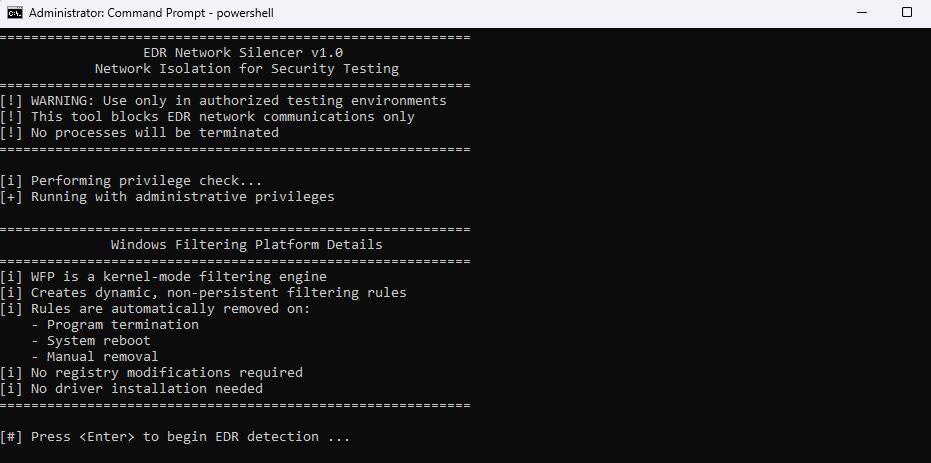
Tools like EDRSilencer leverage specific WFP APIs to turn this defensive capability into an offensive weapon. The attack workflow follows a predictable pattern:
- The tool uses CreateToolhelp32Snapshot to capture running processes
- It correlates these against hardcoded lists of known EDR executables using Process32First and Process32Next
- For matched processes, OpenProcess opens a handle while QueryFullProcessImageNameW retrieves the full executable path
- The path converts to an FWP Application Identifier (FWP_BYTE_BLOB_TYPE)
- Finally, FwpmEngineOpen0 opens a WFP session, and FwpmFilterAdd0 applies blocking rules with FWP_ACTION_BLOCK configured at maximum weight
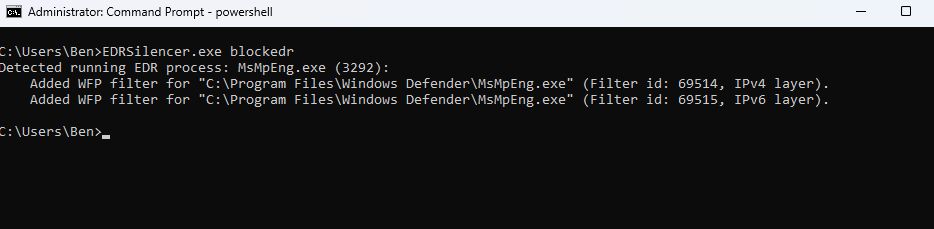
The blocking filters can be verified through the netsh wfp show filters command, which exports configurations to an XML file showing exactly which processes are being isolated from their cloud infrastructure. This technique has proven particularly effective because it operates at the network layer without touching the EDR process itself, making it harder to detect without proper monitoring.
Similar proof-of-concept tools emerged following EDRSilencer’s release. SilentButDeadly and WFP EDR tool both use the same fundamental APIs, though with slight implementation variations. Each tool follows the same core principle: identify EDR processes, extract their network communication patterns, and insert WFP rules to block outbound connections.
Alternative Silencing Methods
Hosts File Manipulation
The classic hosts file (C:\Windows\System32\drivers\etc\hosts) allows administrators to bind domain names to IP addresses. Attackers with elevated privileges can add entries redirecting EDR domains to invalid addresses like localhost:
Powershell
Add-Content –Path “C:\Windows\System32\drivers\etc\hosts” –Value “127.0.0.1 edr.domain.com”
Add-Content –Path “C:\Windows\System32\drivers\etc\hosts.ics” –Value “127.0.0.1 edr.domain.com”
A lesser-known variant involves the hosts.ics file, generated by the Internet Connection Sharing service when computers share internet connections with other devices. Both files present opportunities for disruption when security monitoring fails to track modifications.
The simplicity of this technique makes it attractive to attackers. A single PowerShell command can redirect dozens of EDR communication endpoints to localhost, effectively blinding the security tool while leaving the agent process running normally.
Name Resolution Policy Table (NRPT)
The NRPT controls how Windows resolves specific domain names, determining which DNS servers handle particular domains. The DNS client always checks this table before falling back to default servers.
For Windows Defender for Endpoint deployments, Microsoft publicly lists required domains, information attackers can exploit by adding NRPT rules redirecting DNS queries to localhost:
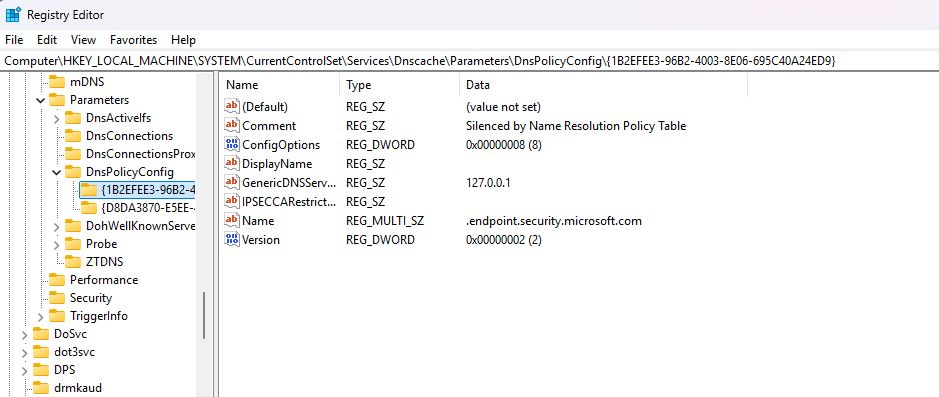
powershellAdd-DnsClientNrptRule -Namespace “.endpoint.security.microsoft.com” -NameServers 127.0.0.1 -Comment “Silenced by NRPT”
Add-DnsClientNrptRule -Namespace “endpoint.security.microsoft.com” -NameServers 127.0.0.1 -Comment “Silenced by NRPT”
Clear-DnsClientCache
“`
These rules persist in registry keys under `HKEY_LOCAL_MACHINE\SOFTWARE\Policies\Microsoft\Windows NT\DNSClient\DnsPolicyConfig`, making them survive system reboots unless specifically removed.

The NRPT approach offers attackers an advantage over hosts file manipulation: it operates at the DNS resolution layer and can apply wildcards to catch multiple subdomains with single rules. This makes it particularly effective against EDR systems that use multiple cloud endpoints for different functions.
### IPSec Filter Rules
IPSec operates at the network layer, typically encrypting or authenticating traffic through Encapsulating Security Payload (ESP) headers. However, IPSec filter rules can block traffic even without IPSec configuration. Using the `netsh` utility, attackers can create policies that prevent EDR communication:
“`
netsh ipsec static add policy name=BlockPolicy description=BlockPolicy
netsh ipsec static set policy name=BlockPolicy assign=y
netsh ipsec static add filteraction name=BlockAction action=block
netsh ipsec static add filter filterlist=BlockFilterList srcaddr=me dstaddr=EDR_IP protocol=tcp
netsh ipsec static add rule name=BlockRule policy=BlockPolicy filterlist=BlockFilterList filteraction=BlockAction
These configurations store in registry keys at HKLM\Software\Policies\Microsoft\Windows\IPSec\Policy\Local where IP addresses appear in hexadecimal format, making manual review challenging for incident responders.
IPSec filter rules provide three possible outcomes for packets: permit (traffic passes without encryption), block (traffic is prevented), or negotiate security (packets are protected). Attackers exploit the block action to prevent EDR communication while maintaining normal network functionality for other applications.
Routing Table Manipulation
Windows maintains routing tables determining how IP packets traverse networks. Custom routes can redirect EDR traffic away from legitimate cloud endpoints:
powershell
Get-NetIPInterface
New-NetRoute –DestinationPrefix “192.168.100.0/32” –InterfaceIndex 1 –PolicyStore ActiveStore
“`

This technique modifies how the operating system forwards packets destined for specific IP ranges. By adding routes that point EDR cloud infrastructure addresses to invalid gateways or local interfaces, attackers ensure connection attempts fail before reaching the network.
### Secondary IP Address Assignment
Perhaps the most lightweight approach involves assigning EDR cloud IP addresses as secondary IPs on the local network interface. When the interface claims ownership of foreign public addresses, the routing table delivers packets locally instead of forwarding them to the internet. Connections fail because no local application listens on those addresses.
Tools like IPMute automate this process by monitoring EDR process TCP connections, capturing remote addresses, and assigning them as secondary IPs across all physical interfaces. This changes the host configuration from DHCP to static IP addressing, with secondary IP fields populated with monitored addresses.

The registry key `HKLM\SYSTEM\CurrentControlSet\Services\Tcpip\Parameters\Interfaces\{GUID}\IPAddress` stores static IP address information, providing forensic evidence of this technique during incident response investigations.
## Detection Opportunities
Organizations running comprehensive security operations need robust detection capabilities to identify these silencing techniques before they enable broader attacks. This is where platforms like [Hawkeye CSOC and XDR](https://hawk-eye.io/hawkeye-csoc-and-xdr/) become critical—providing the unified visibility and correlation capabilities needed to detect subtle communication disruptions across enterprise endpoints. While many procedures rely on PowerShell modules and built-in utilities like `netsh`, the Windows Filtering Platform abuse requires multi-layered monitoring.
### Windows Event Log Monitoring
Active Directory doesn’t enable WFP auditing by default. Organizations must manually configure group policies under:
– **Computer Configuration > Windows Settings > Security Settings > Advanced Audit Policy Configuration > Audit Policies > Policy Change > Audit Filtering Platform Policy Change**
– **Computer Configuration > Windows Settings > Security Settings > Advanced Audit Policy Configuration > Audit Policies > Object Access > Audit Filtering Platform Connection**
– **Computer Configuration > Windows Settings > Security Settings > Advanced Audit Policy Configuration > Audit Policies > Object Access > Audit Filtering Platform Packet Drop**

Enabling these policies generates substantial log volume, but the detection value justifies the storage requirements. Key Windows Event IDs to monitor include:
| Event ID | WFP API Call | Significance |
|———-|————–|————–|
| 5444 | FwpmFilterAdd0 | Filter addition |
| 5157 | FwpmFilterAdd0 | Blocked connection |
| 5441 | FwpmProviderAdd0 | Provider addition |
| 5445 | FwpmFilterDeletebyId0 | Filter deletion |
Detection engineering should focus on Event IDs 5444 and 5157, particularly when processes attempt adding filters that block common EDR executables like `MsSense.exe`, `CSFalconService.exe`, `CylanceSvc.exe`, `elastic-agent.exe`, or `SentinelAgent.exe`.

### Registry Key Monitoring
WFP filters persist in registry locations including:
“`
HKEY_LOCAL_MACHINE\SYSTEM\CurrentControlSet\Services\BFE\Parameters\Policy\Persistent\Filter
“`

SOC teams should investigate GUID values within this key to identify rules associated with EDR processes during incident response. Monitoring this key enables detection of new filter additions before attackers can leverage the blind spot.
For hosts file attacks, auditing requires enabling:
– **Computer Configuration > Windows Settings > Security Settings > Advanced Audit Policy Configuration > Audit Policies > Object Access > Audit File System**
– **Computer Configuration > Windows Settings > Security Settings > Advanced Audit Policy Configuration > Audit Policies > Object Access > Audit Handle Manipulation**

The paths `C:\Windows\System32\drivers\etc\hosts` and `C:\Windows\System32\drivers\etc\hosts.ics` should be specifically added under File System auditing with Read/Write and Modify permissions monitored. Changes appear under Event ID 4663.

NRPT entries store under:
“`
HKEY_LOCAL_MACHINE\SYSTEM\CurrentControlSet\Services\Dnscache\Parameters\DnsPolicyConfig
Monitoring this key enables detection when attackers use Add-DnsClientNrptRule cmdlets. Platforms with comprehensive integration capabilities can correlate PowerShell command-line arguments with subsequent registry modifications to identify the complete attack chain.

IPSec policy changes generate Event IDs 5460 (IPSec Policy Agent Applied) and 5471 (IPSec Policy Agent Loaded), which should correlate with registry access events:
|
Event ID |
Action |
|
4656 |
Handle Request |
|
4663 |
Object Access |
|
4657 |
Registry Value Modification |
|
5460 |
IPSec Policy Agent Applied |
|
5471 |
IPSec Policy Agent Loaded |
Attempts to access and modify IPSec registry keys from the netsh.exe process should be flagged as suspicious, particularly when followed by policy application events.
Endpoint Detection and Response (EDR) systems serve as the eyes and ears of security operations centers, continuously monitoring suspicious activity across enterprise networks. But what happens when attackers find ways to disconnect these watchful eyes from their command centers?
This is the core challenge posed by EDR silencing techniques, methods that allow adversaries to operate undetected by disrupting the communication between EDR agents and their cloud management consoles.
The Mechanics of EDR Communication Disruption
EDR systems rely on persistent, bidirectional communication with cloud management platforms. When this connection breaks, agents continue collecting telemetry locally but cannot generate alerts or receive updated response instructions. Rather than crashing services or terminating processes, actions that would trigger immediate alerts sophisticated attackers manipulate Windows networking components to create a silent blackout.
The 2023 disclosure by MDSec revealed a shift in adversary tactics. Instead of using risky kernel drivers that ransomware groups favored, their FireBlock tool exploited the Windows Filtering Platform (WFP) to add rules preventing EDR egress traffic. This approach proved effective enough that multiple proof-of-concept tools emerged within the security community, demonstrating the technique’s viability.
All execution methods require elevated privileges, meaning attackers must first compromise administrator-level access. This makes privilege escalation monitoring a critical first line of defense that modern XDR platforms prioritize in their detection strategies.
Windows Filtering Platform Exploitation
The Windows Filtering Platform, introduced with Windows Vista, provides APIs and system services for processing and filtering network traffic. Microsoft designed it to replace older interfaces like the Windows Firewall API, offering EDR vendors a standardized way to capture network connections and monitor processes making remote procedure calls.
Tools like EDRSilencer leverage specific WFP APIs to turn this defensive capability into an offensive weapon. The attack workflow follows a predictable pattern:
- The tool uses CreateToolhelp32Snapshot to capture running processes
- It correlates these against hardcoded lists of known EDR executables using Process32First and Process32Next
- For matched processes, OpenProcess opens a handle while QueryFullProcessImageNameW retrieves the full executable path
- The path converts to an FWP Application Identifier (FWP_BYTE_BLOB_TYPE)
Finally, FwpmEngineOpen0 opens a WFP session, and FwpmFilterAdd0 applies blocking rules with FWP_ACTION_BLOCK configured at maximum weightQuantum computing is advancing fast enough to challenge the encryption that secures critical systems across the UAE. The nation has taken a decisive step ahead of that risk with Executive Regulation No. 71 of 2024, issued by the UAE Cybersecurity Council. This regulation mandates a structured cryptographic migration program for government and vital sector entities, shifting away from vulnerable classical algorithms toward quantum-resistant controls.
A Post-Quantum Cryptography Readiness Assessment allows organizations to measure their exposure, identify weak cryptographic assets, and prepare for the UAE’s transition cycle without disrupting essential services. The assessment becomes the foundation for long-term confidentiality, system integrity, and compliance with national cryptographic requirements.
Quantum computing is now a pressing issue for national security and the economy, not just a future concern. The UAE has demonstrated proactive leadership worldwide by approving the National Encryption Policy and issuing its mandatory Executive Regulation to protect the country’s digital infrastructure in the quantum age.
The blocking filters can be verified through the netsh wfp show filters command, which exports configurations to an XML file showing exactly which processes are being isolated from their cloud infrastructure. This technique has proven particularly effective because it operates at the network layer without touching the EDR process itself, making it harder to detect without proper monitoring.
The blocking filters can be verified through the netsh wfp show filters command, which exports configurations to an XML file showing exactly which processes are being isolated from their cloud infrastructure. This technique has proven particularly effective because it operates at the network layer without touching the EDR process itself, making it harder to detect without proper monitoring.
Name Resolution Policy Table Rules
Similar proof-of-concept tools emerged following EDRSilencer’s release. SilentButDeadly and WFP EDR tool both use the same fundamental APIs, though with slight implementation variations. Each tool follows the same core principle: identify EDR processes, extract their network communication patterns, and insert WFP rules to block outbound connections.
Alternative Silencing Methods
Hosts File Manipulation
The classic hosts file (C:\Windows\System32\drivers\etc\hosts) allows administrators to bind domain names to IP addresses. Attackers with elevated privileges can add entries redirecting EDR domains to invalid addresses like localhost:
Powershell
Add-Content –Path “C:\Windows\System32\drivers\etc\hosts” –Value “127.0.0.1 edr.domain.com”
Add-Content –Path “C:\Windows\System32\drivers\etc\hosts.ics” –Value “127.0.0.1 edr.domain.com”
A lesser-known variant involves the hosts.ics file, generated by the Internet Connection Sharing service when computers share internet connections with other devices. Both files present opportunities for disruption when security monitoring fails to track modifications.
The simplicity of this technique makes it attractive to attackers. A single PowerShell command can redirect dozens of EDR communication endpoints to localhost, effectively blinding the security tool while leaving the agent process running normally.
Name Resolution Policy Table (NRPT)
The NRPT controls how Windows resolves specific domain names, determining which DNS servers handle particular domains. The DNS client always checks this table before falling back to default servers. For Windows Defender for Endpoint deployments, Microsoft publicly lists required domains, information attackers can exploit by adding NRPT rules redirecting DNS queries to localhost:
powershellAdd-DnsClientNrptRule -Namespace “.endpoint.security.microsoft.com” -NameServers 127.0.0.1 -Comment “Silenced by NRPT”
Add-DnsClientNrptRule -Namespace “endpoint.security.microsoft.com” -NameServers 127.0.0.1 -Comment “Silenced by NRPT”
Clear-DnsClientCache
“`
These rules persist in registry keys under `HKEY_LOCAL_MACHINE\SOFTWARE\Policies\Microsoft\Windows NT\DNSClient\DnsPolicyConfig`, making them survive system reboots unless specifically removed.

The NRPT approach offers attackers an advantage over hosts file manipulation: it operates at the DNS resolution layer and can apply wildcards to catch multiple subdomains with single rules. This makes it particularly effective against EDR systems that use multiple cloud endpoints for different functions.
### IPSec Filter Rules
IPSec operates at the network layer, typically encrypting or authenticating traffic through Encapsulating Security Payload (ESP) headers. However, IPSec filter rules can block traffic even without IPSec configuration. Using the `netsh` utility, attackers can create policies that prevent EDR communication:
“`
netsh ipsec static add policy name=BlockPolicy description=BlockPolicy
netsh ipsec static set policy name=BlockPolicy assign=y
netsh ipsec static add filteraction name=BlockAction action=block
netsh ipsec static add filter filterlist=BlockFilterList srcaddr=me dstaddr=EDR_IP protocol=tcp
netsh ipsec static add rule name=BlockRule policy=BlockPolicy filterlist=BlockFilterList filteraction=BlockAction
These configurations store in registry keys at HKLM\Software\Policies\Microsoft\Windows\IPSec\Policy\Local where IP addresses appear in hexadecimal format, making manual review challenging for incident responders.
IPSec filter rules provide three possible outcomes for packets: permit (traffic passes without encryption), block (traffic is prevented), or negotiate security (packets are protected). Attackers exploit the block action to prevent EDR communication while maintaining normal network functionality for other applications.
Routing Table Manipulation
Windows maintains routing tables determining how IP packets traverse networks. Custom routes can redirect EDR traffic away from legitimate cloud endpoints:
powershell
Get-NetIPInterface
New-NetRoute –DestinationPrefix “192.168.100.0/32” –InterfaceIndex 1 –PolicyStore ActiveStore
“`

This technique modifies how the operating system forwards packets destined for specific IP ranges. By adding routes that point EDR cloud infrastructure addresses to invalid gateways or local interfaces, attackers ensure connection attempts fail before reaching the network.
### Secondary IP Address Assignment
Perhaps the most lightweight approach involves assigning EDR cloud IP addresses as secondary IPs on the local network interface. When the interface claims ownership of foreign public addresses, the routing table delivers packets locally instead of forwarding them to the internet. Connections fail because no local application listens on those addresses.
Tools like IPMute automate this process by monitoring EDR process TCP connections, capturing remote addresses, and assigning them as secondary IPs across all physical interfaces. This changes the host configuration from DHCP to static IP addressing, with secondary IP fields populated with monitored addresses.

The registry key `HKLM\SYSTEM\CurrentControlSet\Services\Tcpip\Parameters\Interfaces\{GUID}\IPAddress` stores static IP address information, providing forensic evidence of this technique during incident response investigations.
## Detection Opportunities
Organizations running comprehensive security operations need robust detection capabilities to identify these silencing techniques before they enable broader attacks. This is where platforms like [Hawkeye CSOC and XDR](https://hawk-eye.io/hawkeye-csoc-and-xdr/) become critical—providing the unified visibility and correlation capabilities needed to detect subtle communication disruptions across enterprise endpoints. While many procedures rely on PowerShell modules and built-in utilities like `netsh`, the Windows Filtering Platform abuse requires multi-layered monitoring.
### Windows Event Log Monitoring
Active Directory doesn’t enable WFP auditing by default. Organizations must manually configure group policies under:
– **Computer Configuration > Windows Settings > Security Settings > Advanced Audit Policy Configuration > Audit Policies > Policy Change > Audit Filtering Platform Policy Change**
– **Computer Configuration > Windows Settings > Security Settings > Advanced Audit Policy Configuration > Audit Policies > Object Access > Audit Filtering Platform Connection**
– **Computer Configuration > Windows Settings > Security Settings > Advanced Audit Policy Configuration > Audit Policies > Object Access > Audit Filtering Platform Packet Drop**

Enabling these policies generates substantial log volume, but the detection value justifies the storage requirements. Key Windows Event IDs to monitor include:
| Event ID | WFP API Call | Significance |
|———-|————–|————–|
| 5444 | FwpmFilterAdd0 | Filter addition |
| 5157 | FwpmFilterAdd0 | Blocked connection |
| 5441 | FwpmProviderAdd0 | Provider addition |
| 5445 | FwpmFilterDeletebyId0 | Filter deletion |
Detection engineering should focus on Event IDs 5444 and 5157, particularly when processes attempt adding filters that block common EDR executables like `MsSense.exe`, `CSFalconService.exe`, `CylanceSvc.exe`, `elastic-agent.exe`, or `SentinelAgent.exe`.

### Registry Key Monitoring
WFP filters persist in registry locations including:
“`
HKEY_LOCAL_MACHINE\SYSTEM\CurrentControlSet\Services\BFE\Parameters\Policy\Persistent\Filter
“`

SOC teams should investigate GUID values within this key to identify rules associated with EDR processes during incident response. Monitoring this key enables detection of new filter additions before attackers can leverage the blind spot.
For hosts file attacks, auditing requires enabling:
– **Computer Configuration > Windows Settings > Security Settings > Advanced Audit Policy Configuration > Audit Policies > Object Access > Audit File System**
– **Computer Configuration > Windows Settings > Security Settings > Advanced Audit Policy Configuration > Audit Policies > Object Access > Audit Handle Manipulation**

The paths `C:\Windows\System32\drivers\etc\hosts` and `C:\Windows\System32\drivers\etc\hosts.ics` should be specifically added under File System auditing with Read/Write and Modify permissions monitored. Changes appear under Event ID 4663.

NRPT entries store under:
“`
HKEY_LOCAL_MACHINE\SYSTEM\CurrentControlSet\Services\Dnscache\Parameters\DnsPolicyConfig
Monitoring this key enables detection when attackers use Add-DnsClientNrptRule cmdlets. Platforms with comprehensive integration capabilities can correlate PowerShell command-line arguments with subsequent registry modifications to identify the complete attack chain.
IPSec policy changes generate Event IDs 5460 (IPSec Policy Agent Applied) and 5471 (IPSec Policy Agent Loaded), which should correlate with registry access events:
|
Event ID |
Action |
|
4656 |
Handle Request |
|
4663 |
Object Access |
|
4657 |
Registry Value Modification |
|
5460 |
IPSec Policy Agent Applied |
|
5471 |
IPSec Policy Agent Loaded |
Attempts to access and modify IPSec registry keys from the netsh.exe process should be flagged as suspicious, particularly when followed by policy application events.
SIGMA Detection Rule
yaml
title: WFP Blocked Outbound Connection From Common EDR Agent Binary
id: 6b2b5db7-8f7e-4b6e-b9d4-29f0a9edc0d1
status: Production
description: Detects Windows Filtering Platform blocked connection events for common EDR/AV agent processes
references:
– https://github.com/netero1010/EDRSilencer
author: Panos Gkatziroulis
date: 2026-01-06
tags:
– attack.defense-evasion
– attack.t1562
logsource:
product: windows
service: security
detection:
selection:
EventID: 5157
Direction|contains: ‘Outbound’
Application|endswith:
– ‘\MsSense.exe’
– ‘\SenseIR.exe’
– ‘\SenseCncProxy.exe’
– ‘\CSFalconService.exe’
– ‘\CylanceSvc.exe’
– ‘\elastic-agent.exe’
– ‘\SentinelAgent.exe’
– ‘\TaniumClient.exe’
condition: selection
falsepositives:
– Legitimate firewall policy blocks
– Temporary EDR backend outages
level: high
This SIGMA rule provides a starting point for detection, but organizations should customize it based on their specific EDR deployments and approved firewall policies.
Building Resilience Through Layered Defense
EDR silencing demands elevated privileges, meaning attackers have already achieved significant access. However, detection remains possible through proper visibility configuration. Organizations must implement multiple defensive layers:
Policy Enforcement: Deploy group policies that restrict WFP manipulation to authorized administrative processes. Application control solutions can prevent unauthorized binaries from executing WFP API calls, though implementation challenges exist in many enterprises.
Continuous Monitoring: Enable auditing policies for WFP changes, file system modifications, and registry key alterations. The increased log volume requires adequate storage and log management infrastructure, but the detection value justifies the investment.
Behavioral Analytics: Establish baseline network behavior for EDR processes. Sudden drops in outbound connections to known EDR cloud endpoints should trigger immediate investigation, even without specific event log indicators.
Integration and Correlation: Deploy integrated security platforms that correlate events across multiple data sources—combining SIEM, EDR, network monitoring, and endpoint telemetry for comprehensive threat detection. Single-point detection often misses the subtle indicators that become obvious when viewed holistically.
API-Level Monitoring: Validate that EDR providers perform hooking on critical Windows functions like CreateToolhelp32Snapshot, Process32First, Process32Next, QueryFullProcessImageNameW, and OpenProcess. These API calls represent the reconnaissance phase before filter application.
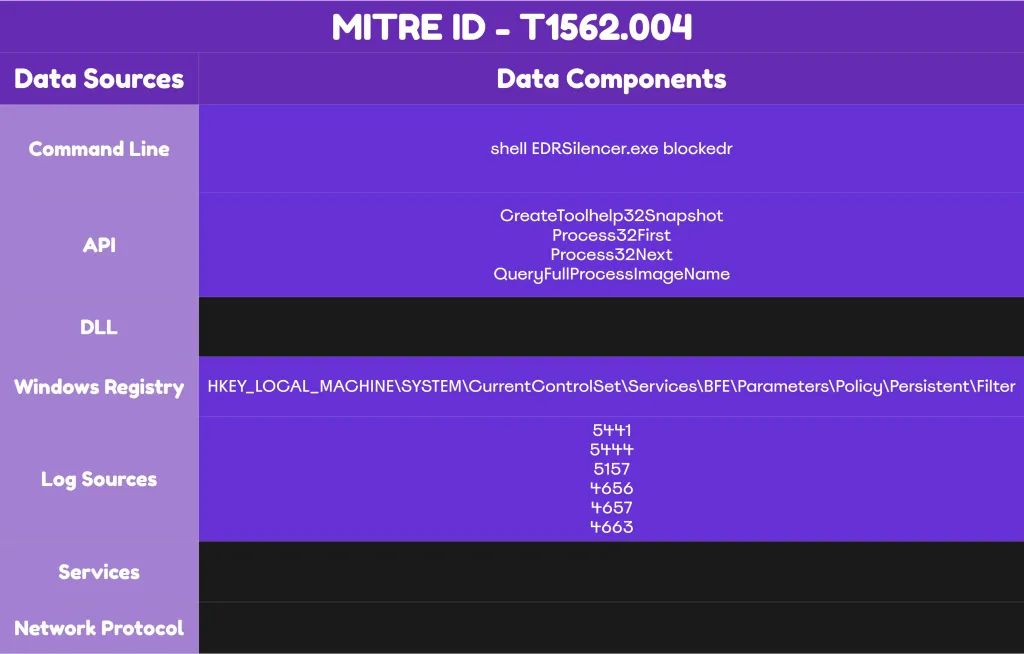
The registry keys, file paths, and Event IDs outlined above provide concrete detection opportunities when properly configured and monitored.
Purple Team Testing Recommendations
Security teams should conduct purple team exercises to validate detection capabilities against EDR silencing techniques. Playbooks should include:
- WFP Filter Testing: Execute EDRSilencer or similar tools in controlled environments to verify Event ID 5444 and 5157 generation and alert triggering
- Hosts File Modification: Test detection of changes to both hosts and hosts.ics files through Event ID 4663 monitoring.
3. NRPT Rule Addition: Validate PowerShell command-line logging and registry change detection when Add-DnsClientNrptRule executes
4.IPSec Policy Creation: Confirm correlation between netsh.exe execution, registry modifications, and Event IDs 5460/5471
5. Secondary IP Assignment: Test detection of network configuration changes through registry monitoring and process behavior analysis
These exercises expose detection gaps before real attackers exploit them. For additional context on building effective detection strategies, organizations can reference threat intelligence resources that provide regular updates on evolving attack techniques.
Conclusion
EDR silencing represents a calculated post-compromise technique allowing attackers to operate with reduced operational security concerns. The various methods—from WFP filter manipulation to simple hosts file edits, share a common requirement: local administrator privileges. This makes privilege escalation detection equally critical to blocking these techniques.
Organizations prepared to enable proper auditing policies and develop corresponding detection rules can identify EDR silencing attempts with high confidence. The key lies not in any single detection mechanism but in layered visibility across registry modifications, Windows event logs, file system changes, and API-level monitoring.
Changes to hosts files, NRPT tables, or WFP rules should be treated as critical security events requiring immediate investigation. The detection opportunities exist, but only for organizations willing to enable the necessary visibility and allocate resources to proper monitoring.
When defenders understand how attackers blind their tools, they can ensure those tools never lose sight of what matters. EDR silencing may provide temporary concealment, but proper detection engineering ensures that concealment doesn’t last long enough to matter.
SIGMA Detection Rule
yaml
title: WFP Blocked Outbound Connection From Common EDR Agent Binary
id: 6b2b5db7-8f7e-4b6e-b9d4-29f0a9edc0d1
status: Production
description: Detects Windows Filtering Platform blocked connection events for common EDR/AV agent processes
references:
– https://github.com/netero1010/EDRSilencer
author: Panos Gkatziroulis
date: 2026-01-06
tags:
– attack.defense-evasion
– attack.t1562
logsource:
product: windows
service: security
detection:
selection:
EventID: 5157
Direction|contains: ‘Outbound’
Application|endswith:
– ‘\MsSense.exe’
– ‘\SenseIR.exe’
– ‘\SenseCncProxy.exe’
– ‘\CSFalconService.exe’
– ‘\CylanceSvc.exe’
– ‘\elastic-agent.exe’
– ‘\SentinelAgent.exe’
– ‘\TaniumClient.exe’
condition: selection
falsepositives:
– Legitimate firewall policy blocks
– Temporary EDR backend outages
level: high
This SIGMA rule provides a starting point for detection, but organizations should customize it based on their specific EDR deployments and approved firewall policies.
Building Resilience Through Layered Defense
EDR silencing demands elevated privileges, meaning attackers have already achieved significant access. However, detection remains possible through proper visibility configuration. Organizations must implement multiple defensive layers:
Policy Enforcement: Deploy group policies that restrict WFP manipulation to authorized administrative processes. Application control solutions can prevent unauthorized binaries from executing WFP API calls, though implementation challenges exist in many enterprises.
Continuous Monitoring: Enable auditing policies for WFP changes, file system modifications, and registry key alterations. The increased log volume requires adequate storage and log management infrastructure, but the detection value justifies the investment.
Behavioral Analytics: Establish baseline network behavior for EDR processes. Sudden drops in outbound connections to known EDR cloud endpoints should trigger immediate investigation, even without specific event log indicators.
Integration and Correlation: Deploy integrated security platforms that correlate events across multiple data sources—combining SIEM, EDR, network monitoring, and endpoint telemetry for comprehensive threat detection. Single-point detection often misses the subtle indicators that become obvious when viewed holistically.
API-Level Monitoring: Validate that EDR providers perform hooking on critical Windows functions like CreateToolhelp32Snapshot, Process32First, Process32Next, QueryFullProcessImageNameW, and OpenProcess. These API calls represent the reconnaissance phase before filter application.
The registry keys, file paths, and Event IDs outlined above provide concrete detection opportunities when properly configured and monitored.
Purple Team Testing Recommendations
Security teams should conduct purple team exercises to validate detection capabilities against EDR silencing techniques. Playbooks should include:
- WFP Filter Testing: Execute EDRSilencer or similar tools in controlled environments to verify Event ID 5444 and 5157 generation and alert triggering
- Hosts File Modification: Test detection of changes to both hosts and hosts.ics files through Event ID 4663 monitoring
- NRPT Rule Addition: Validate PowerShell command-line logging and registry change detection when Add-DnsClientNrptRule executes
- IPSec Policy Creation: Confirm correlation between netsh.exe execution, registry modifications, and Event IDs 5460/5471
- Secondary IP Assignment: Test detection of network configuration changes through registry monitoring and process behavior analysis
These exercises expose detection gaps before real attackers exploit them. For additional context on building effective detection strategies, organizations can reference threat intelligence resources that provide regular updates on evolving attack techniques.
Conclusion
EDR silencing represents a calculated post-compromise technique allowing attackers to operate with reduced operational security concerns. The various methods—from WFP filter manipulation to simple hosts file edits, share a common requirement: local administrator privileges. This makes privilege escalation detection equally critical to blocking these techniques.
Organizations prepared to enable proper auditing policies and develop corresponding detection rules can identify EDR silencing attempts with high confidence. The key lies not in any single detection mechanism but in layered visibility across registry modifications, Windows event logs, file system changes, and API-level monitoring.
Changes to hosts files, NRPT tables, or WFP rules should be treated as critical security events requiring immediate investigation. The detection opportunities exist, but only for organizations willing to enable the necessary visibility and allocate resources to proper monitoring.
When defenders understand how attackers blind their tools, they can ensure those tools never lose sight of what matters. EDR silencing may provide temporary concealment, but proper detection engineering ensures that concealment doesn’t last long enough to matter.
See also:







 Dubai
Dubai